Movavi Launches Video Templates: Major Movavi Video Editor 2027 Update Rolls Out
LIMASSOL, CYPRUS, October 1, 2026 /EINPresswire.com/ -- First Out of the Blocks: Movavi reimagines the standard video
Press Release Disclaimer: This is a press release distributed through the XPR Media network. It has not been independently verified by our newsroom.
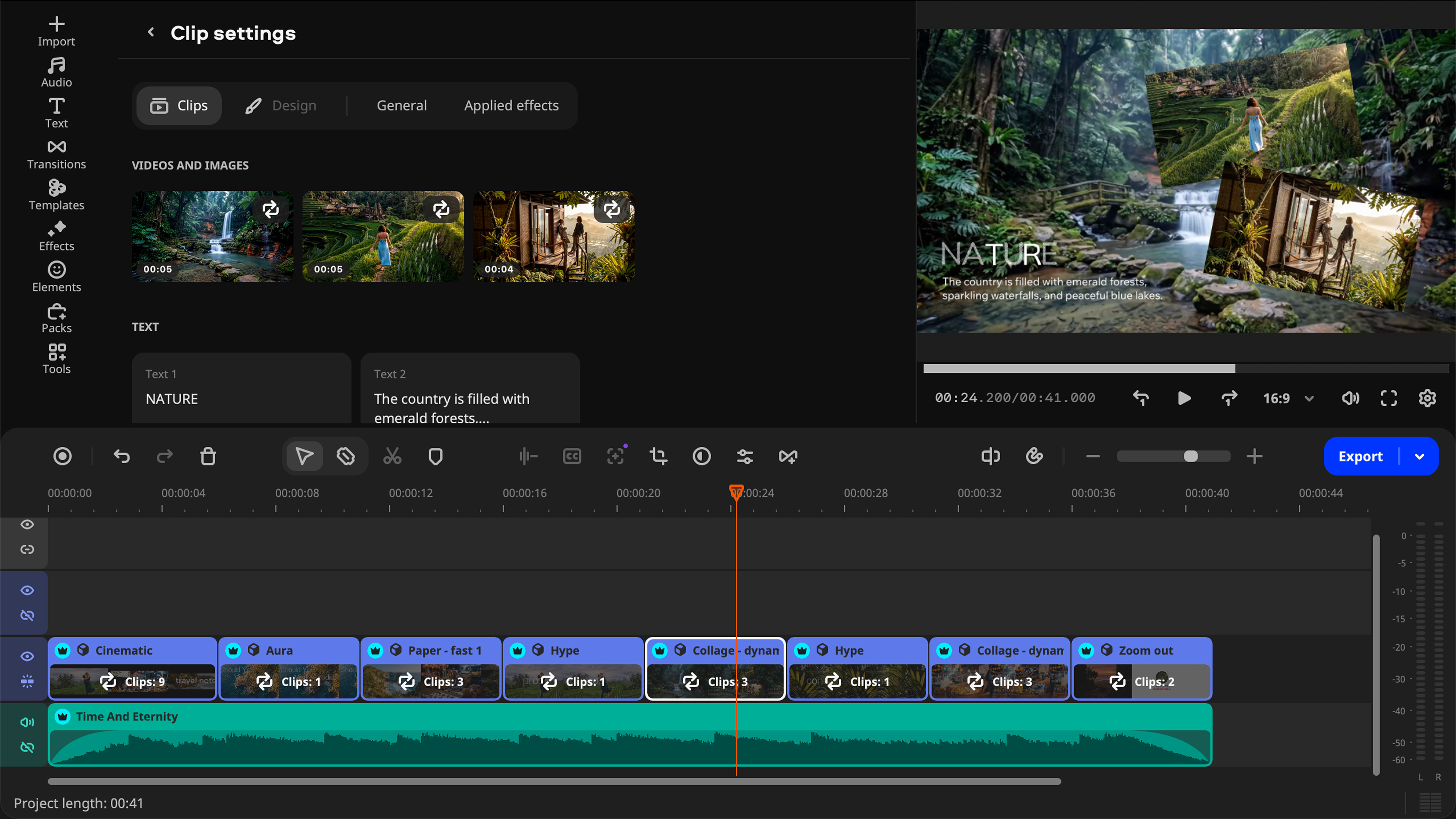

LIMASSOL, CYPRUS, October 1, 2026 /EINPresswire.com/ — First Out of the Blocks: Movavi reimagines the standard video template, introducing Movavi Templates, built from flexible, reorderable Blocks instead of one-piece designs. A multi-style library of customizable, pro-looking templates for any kind of video is now available in Movavi Video Editor major update.
Movavi, developer of easy-to-use multimedia software used by more than 70 million people worldwide, announced the major update to its flagship desktop software, Movavi Video Editor 2027. The headline addition is Movavi Templates, a multi-style library of video templates, built from modular, reorderable segments called Blocks, alongside a set of new AI-powered tools designed to speed up editing even further.
“Anyone who’s tried editing a video knows the trade-off: either you settle for something that looks amateurish, or you spend hours getting it right. Movavi Video Templates change that math. They give creators a professional-looking video in minutes, and because they are easily customized using the provided building Blocks and color themes, they easily fit with your own content, so each edit is still uniquely yours,” said David Kalayejian, Lead Product Manager at Movavi.
Movavi Video Templates is a multi-style library of pro-looking, modular templates for any kind of video. Unlike conventional video templates, Movavi Templates are built from Blocks — short, pre-edited, customizable video segments such as intros, countdowns, quick cuts, animated collages, and more. Users can drop their own footage, photos, and text into a template and use it as-is, or customize it by reordering, adding, or removing Blocks to match their own style, cutting a project down to a few minutes of editing instead of creating a video from a blank timeline.
Blocks aren’t limited to templates, either. Creators looking for more creative freedom can use the Blocks on their own, without a template, choosing exactly the pieces they need for the project.
Key highlights of Movavi Templates include:
– Not like the usual templates: built from flexible Blocks that can be rearranged rather than fixed, one-piece designs, and combined with manual edits for a personal touch.
– Blocks: short, pre-edited video parts that can be moved, swapped, and adjusted individually.
– Templates for any occasion: vlogs, business promos, family videos, holidays, reviews, cooking, health and fitness, gaming, and more.
– Editing built in: transitions, music, and text design come pre-set, without additional setup needed.
Several Movavi Video Templates are included in the full version of Movavi Video Editor 2027 at no extra cost. The complete, regularly-updated library of Templates and Blocks can be added through the Movavi Templates subscription.
Movavi Video Editor 2027 also expands the software’s one-click AI toolset, building on tools already available in Movavi Video Editor, such as AI-generated subtitles, audio noise removal, motion tracking, and background removal. The update introduces two fresh one-click tools: auto-tracked cropping, which keeps the speaker or product centered when reframing footage, including when converting horizontal video into vertical formats, and AI video denoise, which clears grain and low-light artifacts while keeping faces, textures, and edges sharp, which is useful for low-light clips, older mobile footage, and archival video restoration.
Movavi Video Editor 2027 is available starting September 29 for Windows 10 and 11 and macOS 12.0 or higher with native support for ARM-based processors, including Apple M1 and newer devices. A free version is available for download at movavi.com/video-editor-plus, with the full version and the Movavi Templates and Movavi Effects subscriptions available as upgrades.
About Movavi:
Movavi is an international software company that develops tools for video, audio, and image editing: Movavi Video Editor, Movavi Video Converter, Movavi Screen Recorder, Movavi Photo Editor, Movavi Slideshow Maker etc. The programs are built to be simple and intuitive, with one-click AI tools and templates that automate routine tasks and save time. This makes Movavi software a great fit for everyday creators — whether they’re just getting started or already familiar with editing. The company also offers a wide collection of video ideas across different themes, so users always have something new to create.
Trusted by over 70 million users in 190+ countries, Movavi delivers 25+ updates a year.
Katherine Tay
Movavi
k.tay@movavi.com
Visit us on social media:
LinkedIn
Instagram
Facebook
YouTube
Legal Disclaimer:
EIN Presswire provides this news content “as is” without warranty of any kind. We do not accept any responsibility or liability
for the accuracy, content, images, videos, licenses, completeness, legality, or reliability of the information contained in this
article. If you have any complaints or copyright issues related to this article, kindly contact the author above.

Media gallery